The problem
Tracking everything in Fabric is difficult, especially when you're not a Fabric admin or the Power BI admin.
While working for a client, I noticed that in many of their workspaces, numerous items were failing to refresh. Some had been failing for over two years, yet no one seemed to care about fixing or deleting them.
That annoyed me, and I wanted to fix it. I wanted to know, across everything I could see, what was failing to refresh, who owned it, and how long it had been broken, so I could nudge the owner to take action.
Unfortunately, none of the built-in options answer that need well.
- OneLake catalog explorer has most of the fields I need, but filtering is shallow and there is no way to see everything at once. You browse one item at a time.
- Fabric Monitor Hub is closer to what I want, but it's a run log, not an inventory: every refresh is a new row, so the same report can appear a dozen times a day. There's no way to ask "what is broken right now" without wading through history, and no way to contact an owner from there.
- The OneLake Catalog Governance report (the Power BI report Microsoft ships over the governance semantic model) is genuinely the best view of the three, except it only shows items I own. Everything owned by anyone else is invisible, which defeats the point of an overview.
None of them give a single really useful filterable surface with a way to act on what it shows. So I built one.
What I built
A small pipeline that collects everything I have access to across the tenant, lands it as a Delta table, and serves it through a regular layer I'd use for a PBI report, plus a button that emails the owner of anything broken.
| Layer | Tool |
|---|---|
| Collection | PySpark notebook (Fabric) |
| Storage | Delta table |
| Query layer | SQL analytics endpoint |
| Model | Power BI semantic model |
| Report | Power BI, with an HTML-content visual |
| Notification | Power Automate cloud flow, triggered from the report |

Nothing here is exotic. That's deliberate: it's the same stack I'd use for any other report, which means no new tool to maintain and no extra permissions to ask for.
Collecting the inventory
A PySpark notebook walks every workspace and item I have access to, and pulls owner, item type, workspace name and id, last refresh time and refresh status for each, among other infos. The result gets written to a Delta table: append the run, keep history, so if a colleague runs the notebook instead of me, the items he has access and I don't get added to the table without removing items I have access to and my colleague does not.
As a notebook and the resulting delta table from it live in a Lakehouse, and every Lakehouse has its own SQL Analytics Endpoint in Microsoft Fabric, the Delta table's data will also show up there, where it can be queried using Spark SQL. It is also where the semantic model is created to later be used in the final Power BI report.
import base64
import json
import requests
from datetime import datetime
from concurrent.futures import ThreadPoolExecutor, as_completed
import numpy as np
import pandas as pd
import sempy.fabric as fabric
from sempy.fabric import PowerBIRestClient
from pyspark.sql.functions import col
from pyspark.sql.types import BooleanType, TimestampType, NullType, StringType
try:
from notebookutils import mssparkutils
except ImportError:
mssparkutils = None
def get_notebook_user():
"""Extracts the logged-in user's Entra ID email/UPN by parsing the bearer JWT access token."""
if mssparkutils:
try:
token = mssparkutils.credentials.getToken("pbi")
if token:
payload_b64 = token.split(".")[1]
payload_b64 += "=" * ((4 - len(payload_b64) % 4) % 4)
payload = json.loads(base64.b64decode(payload_b64).decode("utf-8"))
user_identity = (
payload.get("upn")
or payload.get("email")
or payload.get("preferred_username")
or payload.get("unique_name")
)
if user_identity:
return str(user_identity).lower().strip()
except Exception:
pass
try:
user_email = mssparkutils.env.getUserEmail()
if user_email and user_email != "trusted-service-user":
return user_email
except Exception:
pass
return "UnknownUser"
def get_graph_token():
"""Fetches Microsoft Graph API token using mssparkutils."""
if mssparkutils:
try:
return mssparkutils.credentials.getToken("https://graph.microsoft.com/")
except Exception:
return None
return None
def resolve_graph_user_emails(owner_list, graph_token):
"""Queries Microsoft Graph API to map User IDs/UPNs to primary mail and display name."""
user_map = {}
if not graph_token or not owner_list:
return user_map
headers = {"Authorization": f"Bearer {graph_token}"}
unique_owners = {str(o).strip() for o in owner_list if pd.notna(o)}
for owner in unique_owners:
owner_key = owner.lower()
if owner_key in ["none", "nan", "<na>"]:
continue
url = f"https://graph.microsoft.com/v1.0/users/{owner}?$select=mail,userPrincipalName,displayName"
try:
resp = requests.get(url, headers=headers, timeout=5)
if resp.status_code == 200:
data = resp.json()
mail = data.get("mail") or data.get("userPrincipalName")
if mail:
user_map[owner_key] = {
"email": mail,
"name": data.get("displayName"),
}
except Exception:
pass
return user_map
def process_workspace(ws_row, pbi_client):
"""Extracts metadata for a single workspace, resolving workspace admins and item attributes."""
ws_id = ws_row["Id"]
ws_name = ws_row.get("Name", ws_row.get("Workspace Name", "Unknown Workspace"))
fabric_token = None
if mssparkutils:
try:
fabric_token = mssparkutils.credentials.getToken("pbi")
except Exception:
pass
try:
user_name_map = {}
user_email_map = {}
primary_ws_admin = None
ws_admin_names = []
ws_admin_emails = []
# 1. Map Workspace Access Users & Workspace Admins
try:
users_resp = pbi_client.get(f"v1.0/myorg/groups/{ws_id}/users")
if users_resp.status_code == 200:
for u in users_resp.json().get("value", []):
d_name = u.get("displayName")
email_addr = u.get("emailAddress")
ident = u.get("identifier")
role = u.get("groupUserAccessRight")
for key in filter(None, [ident, email_addr]):
clean_key = str(key).lower().strip()
if d_name:
user_name_map[clean_key] = d_name
if email_addr:
user_email_map[clean_key] = email_addr
if not primary_ws_admin and role in ["Admin", "Member"]:
primary_ws_admin = email_addr or ident
if role == "Admin":
if d_name and d_name not in ws_admin_names:
ws_admin_names.append(d_name)
admin_identifier = email_addr or ident
if admin_identifier and admin_identifier not in ws_admin_emails:
ws_admin_emails.append(admin_identifier)
except Exception:
pass
ws_admins_str = "; ".join(ws_admin_names) if ws_admin_names else None
ws_admin_emails_str = "; ".join(ws_admin_emails) if ws_admin_emails else None
# 2. Extract Workspace Base Items
df_items = fabric.list_items(workspace=ws_id)
if df_items.empty:
df_items = pd.DataFrame(
columns=["Id", "Name", "DisplayName", "Description", "Type", "FolderId"]
)
else:
df_items.columns = [c.replace(" ", "") for c in df_items.columns]
# --- OPTIMIZATION: Immediately drop unused columns at the source ---
unwanted_cols = [
"LastUsedTime",
"LastUpdatedDate",
"OwnerSource",
"TotalViews",
"LastExecutionTime",
"LastExecutionStatus"
]
df_items.drop(columns=[c for c in unwanted_cols if c in df_items.columns], inplace=True)
name_col = next(
(c for c in ["DisplayName", "Name", "ItemName"] if c in df_items.columns),
None,
)
item_name = df_items[name_col] if name_col else "Unknown"
df_items["Name"] = item_name
df_items["DisplayName"] = item_name
for col_name in ["Description", "FolderId", "Type", "Id"]:
if col_name not in df_items.columns:
df_items[col_name] = None
df_items["WorkspaceId"] = ws_id
df_items["WorkspaceName"] = ws_name
df_items["WorkspaceAdmins"] = ws_admins_str
df_items["WorkspaceAdminEmails"] = ws_admin_emails_str
df_items["Owner"] = None
df_items["OwnerEmail"] = None
df_items["OwnerName"] = None
df_items["LastRefreshTime"] = None
df_items["LastRefreshStatus"] = None
# 3. Fetch Gen1 Dataflows
try:
df_resp = pbi_client.get(f"v1.0/myorg/groups/{ws_id}/dataflows")
if df_resp.status_code == 200:
gen1_dataflows = df_resp.json().get("value", [])
df_list = []
for df in gen1_dataflows:
df_id = df.get("objectId")
df_owner = df.get("configuredBy")
owner_key = str(df_owner).lower().strip() if df_owner else None
ref_time, ref_status = None, None
try:
tx_resp = pbi_client.get(
f"v1.0/myorg/groups/{ws_id}/dataflows/{df_id}/transactions"
)
if tx_resp.status_code == 200:
txs = tx_resp.json().get("value", [])
if txs:
latest_tx = txs[0]
ref_time = latest_tx.get("endTime", latest_tx.get("startTime"))
ref_status = latest_tx.get("status")
except Exception:
pass
df_list.append({
"Id": df_id,
"Name": df.get("name"),
"DisplayName": df.get("name"),
"Description": df.get("description"),
"Type": "DataflowGen1",
"WorkspaceId": ws_id,
"WorkspaceName": ws_name,
"WorkspaceAdmins": ws_admins_str,
"WorkspaceAdminEmails": ws_admin_emails_str,
"FolderId": df.get("folderId"),
"Owner": df_owner,
"OwnerEmail": user_email_map.get(owner_key) if owner_key else None,
"OwnerName": user_name_map.get(owner_key) if owner_key else None,
"LastRefreshTime": ref_time,
"LastRefreshStatus": ref_status,
})
if df_list:
df_items = pd.concat([df_items, pd.DataFrame(df_list)], ignore_index=True)
except Exception:
pass
if df_items.empty or df_items["Id"].isna().all():
return None
# 4. Fetch Dataset Metadata & Refreshes
try:
ds_resp = pbi_client.get(f"v1.0/myorg/groups/{ws_id}/datasets")
if ds_resp.status_code == 200:
datasets = ds_resp.json().get("value", [])
dataset_dict = {}
for ds in datasets:
ds_id = str(ds.get("id")).strip().lower()
owner_login = ds.get("configuredBy")
owner_key = str(owner_login).lower().strip() if owner_login else None
ref_time, ref_status = None, None
if ds.get("isRefreshable"):
try:
ref_resp = pbi_client.get(
f"v1.0/myorg/groups/{ws_id}/datasets/{ds_id}/refreshes?$top=1"
)
if ref_resp.status_code == 200:
refreshes = ref_resp.json().get("value", [])
if refreshes:
latest = refreshes[0]
ref_time = latest.get("endTime", latest.get("startTime"))
ref_status = latest.get("status")
except Exception:
pass
dataset_dict[ds_id] = {
"owner": owner_login,
"owner_email": user_email_map.get(owner_key),
"owner_name": user_name_map.get(owner_key),
"refresh_time": ref_time,
"refresh_status": ref_status,
}
clean_ids = df_items["Id"].astype(str).str.strip().str.lower()
for idx, ds_id in enumerate(clean_ids):
if ds_id in dataset_dict:
info = dataset_dict[ds_id]
df_items.loc[idx, "Owner"] = info["owner"]
df_items.loc[idx, "OwnerEmail"] = info["owner_email"]
df_items.loc[idx, "OwnerName"] = info["owner_name"]
df_items.loc[idx, "LastRefreshTime"] = info["refresh_time"]
df_items.loc[idx, "LastRefreshStatus"] = info["refresh_status"]
except Exception:
pass
# 5. Resolve Job Executions & Fallback Owners for Fabric Native Items
job_types = ["datapipeline", "notebook", "dataflow", "dataflowgen2", "lakehouse"]
headers = {"Authorization": f"Bearer {fabric_token}"} if fabric_token else None
admin_key = str(primary_ws_admin).lower().strip() if primary_ws_admin else None
for idx in df_items.index:
item_id = df_items.loc[idx, "Id"]
item_type = str(df_items.loc[idx, "Type"]).lower()
# Apply Workspace Admin fallback if missing Owner
if pd.isna(df_items.loc[idx, "Owner"]) or not df_items.loc[idx, "Owner"]:
df_items.loc[idx, "Owner"] = primary_ws_admin
df_items.loc[idx, "OwnerEmail"] = user_email_map.get(admin_key, primary_ws_admin)
df_items.loc[idx, "OwnerName"] = user_name_map.get(admin_key)
# Query Job Instances API for refresh details
if headers and any(jt in item_type for jt in job_types) and item_id:
try:
job_url = f"https://api.fabric.microsoft.com/v1/workspaces/{ws_id}/items/{item_id}/jobs/instances"
job_resp = requests.get(job_url, headers=headers, timeout=3)
if job_resp.status_code == 200:
instances = job_resp.json().get("value", [])
if instances:
exec_time = instances[0].get("endTime") or instances[0].get("startTime")
df_items.loc[idx, "LastRefreshTime"] = exec_time
df_items.loc[idx, "LastRefreshStatus"] = instances[0].get("status")
except Exception:
pass
# Flag System Items
model_names = ["Report Usage Metrics Model", "Usage Metrics Report"]
df_items["IsSystemItem"] = df_items["Name"].apply(
lambda x: any(kw.lower() in str(x).lower() for kw in model_names)
)
return df_items
except Exception:
return None
# Main Execution Block
try:
pbi_client = PowerBIRestClient()
df_workspaces = fabric.list_workspaces()
all_items = []
run_timestamp = datetime.now()
current_notebook_user = get_notebook_user()
# Parallelize workspace retrieval across 10 threads
with ThreadPoolExecutor(max_workers=10) as executor:
futures = [
executor.submit(process_workspace, row, pbi_client)
for _, row in df_workspaces.iterrows()
]
for future in as_completed(futures):
res = future.result()
if res is not None and not res.empty:
all_items.append(res)
if all_items:
df_catalog = pd.concat(all_items, ignore_index=True)
df_catalog = df_catalog.loc[:, ~df_catalog.columns.duplicated()]
df_catalog["ExecutionTimestamp"] = run_timestamp
df_catalog["NotebookUser"] = current_notebook_user
# Microsoft Graph API Resolution for primary user emails
graph_token = get_graph_token()
if graph_token and "Owner" in df_catalog.columns:
graph_user_map = resolve_graph_user_emails(
df_catalog["Owner"].dropna().unique(), graph_token
)
for idx in df_catalog.index:
owner_val = df_catalog.loc[idx, "Owner"]
if pd.notna(owner_val):
key = str(owner_val).lower().strip()
if key in graph_user_map:
if pd.isna(df_catalog.loc[idx, "OwnerEmail"]) or not df_catalog.loc[idx, "OwnerEmail"]:
df_catalog.loc[idx, "OwnerEmail"] = graph_user_map[key]["email"]
if pd.isna(df_catalog.loc[idx, "OwnerName"]) or not df_catalog.loc[idx, "OwnerName"]:
df_catalog.loc[idx, "OwnerName"] = graph_user_map[key]["name"]
# Safe Fallbacks & Coalesce
if "OwnerEmail" in df_catalog.columns and "Owner" in df_catalog.columns:
df_catalog["OwnerEmail"] = df_catalog["OwnerEmail"].replace("", None)
is_valid_email = df_catalog["Owner"].astype(str).str.contains("@", na=False)
df_catalog.loc[df_catalog["OwnerEmail"].isna() & is_valid_email, "OwnerEmail"] = df_catalog["Owner"]
if "OwnerName" in df_catalog.columns and "OwnerEmail" in df_catalog.columns:
df_catalog["OwnerName"] = df_catalog["OwnerName"].replace("", None).fillna(df_catalog["OwnerEmail"])
# Vectorized Item Link Generation
type_map = {
"semanticmodel": "datasets",
"dataset": "datasets",
"datapipeline": "pipelines",
"pipeline": "pipelines",
"dataflowgen1": "dataflows",
"dataflowgen2": "dataflows",
"dataflow": "dataflows",
"sqlendpoint": "sqlendpoints",
"sqldatabasedefinition": "sqldatabasedefinitions",
}
item_type_clean = df_catalog["Type"].astype(str).str.strip().str.lower()
path_type = item_type_clean.map(type_map).fillna(
item_type_clean.apply(lambda x: x if x.endswith("s") else x + "s")
)
df_catalog["ItemLink"] = (
"https://app.fabric.microsoft.com/groups/"
+ df_catalog["WorkspaceId"].astype(str)
+ "/"
+ path_type
+ "/"
+ df_catalog["Id"].astype(str)
)
invalid_link = (
df_catalog["WorkspaceId"].isna()
| df_catalog["Id"].isna()
| (df_catalog["Id"].astype(str).str.lower() == "none")
)
df_catalog.loc[invalid_link, "ItemLink"] = None
# Vectorized Status Cleaning
if "LastRefreshStatus" in df_catalog.columns:
s = df_catalog["LastRefreshStatus"].astype(str).str.strip()
null_mask = df_catalog["LastRefreshStatus"].isna() | s.str.lower().isin(["none", "nan", "<na>"])
cond_22 = s == "22"
cond_cancel = s.str.lower().str.startswith("cancelled")
cond_disabled = s.str.lower().str.startswith("disabled")
df_catalog["LastRefreshStatus"] = np.select(
[cond_22, cond_cancel, cond_disabled, null_mask],
["Unknown", "Cancelled", "Disabled", None],
default=s,
)
# Derive Owner Type (If WorkspaceId = OwnerEmail then Group else Person)
ws_clean = df_catalog["WorkspaceId"].fillna("").astype(str).str.strip().str.lower()
owner_email_clean = df_catalog["OwnerEmail"].fillna("").astype(str).str.strip().str.lower()
df_catalog["OwnerType"] = np.where(
(ws_clean == owner_email_clean) & (ws_clean != ""),
"Group",
"Person",
)
# Datetime Conversions
for col_name in ["LastRefreshTime", "ExecutionTimestamp"]:
if col_name in df_catalog.columns:
df_catalog[col_name] = pd.to_datetime(df_catalog[col_name], errors="coerce")
# Convert to PySpark & Cast Schema
spark_df = spark.createDataFrame(df_catalog)
# Cast known timestamp columns
for col_name in ["ExecutionTimestamp", "LastRefreshTime"]:
if col_name in spark_df.columns:
spark_df = spark_df.withColumn(col_name, col(col_name).cast(TimestampType()))
if "IsSystemItem" in spark_df.columns:
spark_df = spark_df.withColumn("IsSystemItem", col("IsSystemItem").cast(BooleanType()))
# Safety Check: Catch any other completely null columns and cast them to StringType
# to prevent future 'VOID' type errors from the Semantic Model engine.
for field in spark_df.schema.fields:
if isinstance(field.dataType, NullType):
spark_df = spark_df.withColumn(field.name, col(field.name).cast(StringType()))
# Reconcile Multi-User Runs against Existing Delta Table
table_name = "Catalog_Inventory_Analysis"
try:
existing_df = spark.read.table(table_name)
other_users_df = existing_df.filter(col("NotebookUser") != current_notebook_user)
preserved_df = other_users_df.join(
spark_df.select("WorkspaceId", "Id"),
on=["WorkspaceId", "Id"],
how="left_anti",
)
final_df = preserved_df.unionByName(spark_df, allowMissingColumns=True)
except Exception:
final_df = spark_df
# Save to Delta Table
final_df.write.mode("overwrite").option("overwriteSchema", "true").format("delta").saveAsTable(table_name)
print(
f"SUCCESS: Catalog refreshed by user '{current_notebook_user}'. Processed {len(df_catalog)} active items."
)
display(final_df)
else:
print("FAILED: No items were extracted or processed.")
except Exception as global_err:
print(f"FAILED: Script execution encountered a critical error: {global_err}")From Delta table to report
The SQL analytics endpoint reads the Delta table directly, so there's no separate export or copy step.
The only table used in the semantic model is the one created by the notebook, but we will add a few measures on top that will help us later with the email sending.
The table alone gives us all the information and the filtering ability the built-in options couldn't do well, and using only it's fields we can get to the first page of the report where we can see all the items, item type, who owns what, directly link to each, refresh status among some other useful metrics. Here it's just slicers on a table.

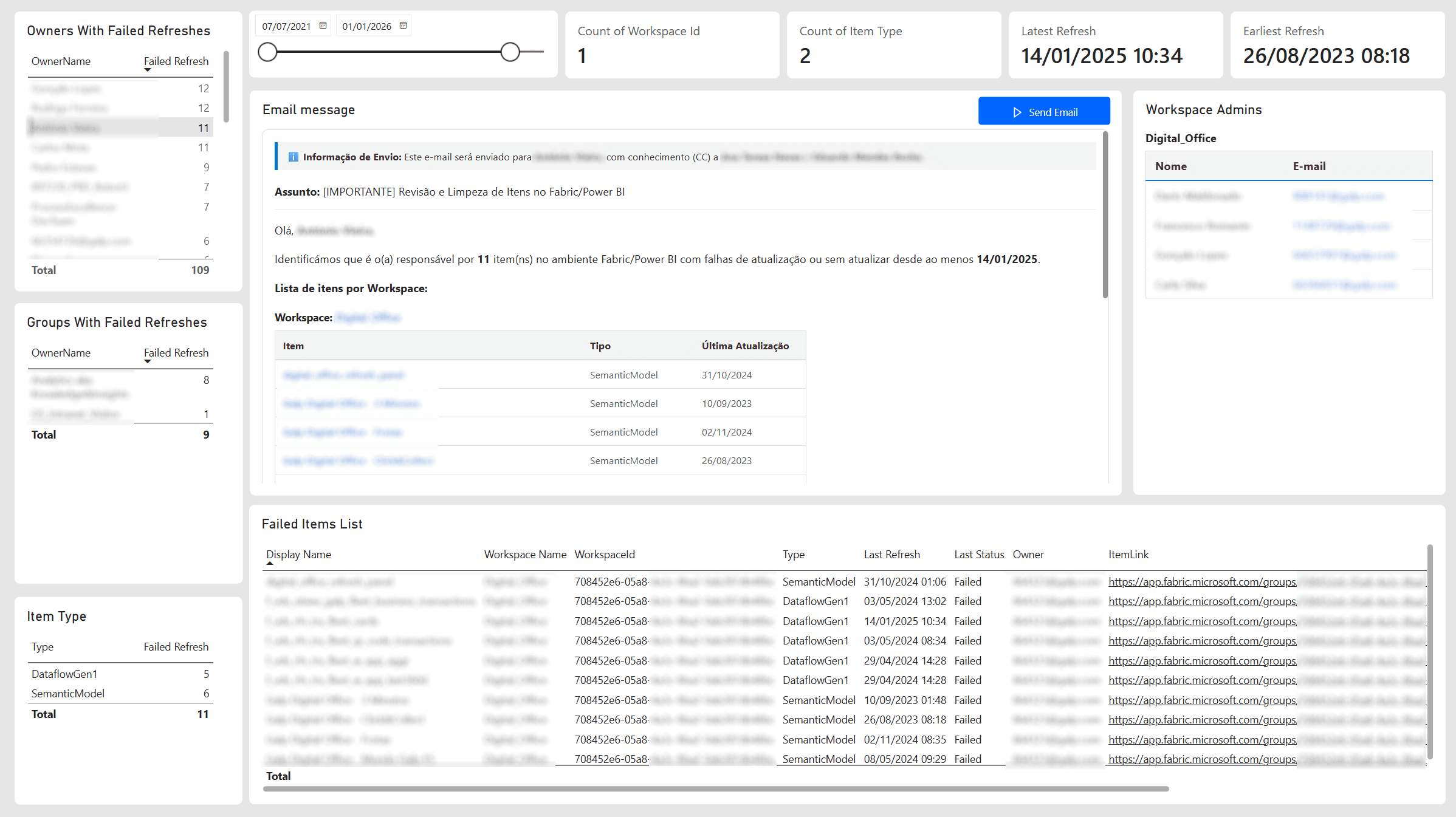
On the second page is where we nudge people. It uses a custom visual from the Power BI marketplace that renders HTML. A few measures build the email body: a table of the owner's failing items, since-when, and a plain ask to look at them, as an HTML string, and the visual renders it exactly as the recipient will see it before anything is sent. By selecting a person on the left side visual the email is loaded and we are one click away from notifying them they need to take action on failing refreshes on Fabric items.
There is a page level filter here to only show item with failing refresh status.
Measures for the email
These are all the measures you'll need to get the same result I have.
WorkspaceLink will give you the full URL for a workspace.
WorkspaceLink = "https://app.fabric.microsoft.com/groups/" & SELECTEDVALUE(catalog_inventory_analysis[WorkspaceId])`Workspace Admin Data gives you a nice table in HTML with all admins of the selected workspaces.
Workspace Admins Data =
VAR DistinctWorkspaces =
    SUMMARIZE(
        'catalog_inventory_analysis',
        'catalog_inventory_analysis'[WorkspaceId],
        "WS_Name", MAX('catalog_inventory_analysis'[WorkspaceName]),
        "WS_Names", MAX('catalog_inventory_analysis'[WorkspaceAdmins]),
        "WS_Emails", MAX('catalog_inventory_analysis'[WorkspaceAdminEmails])
    )

RETURN
CONCATENATEX(
    DistinctWorkspaces,
    VAR CurrentWS = [WS_Name]
    VAR RawNames = [WS_Names]
    VAR RawEmails = [WS_Emails]

    -- Normalize delimiters (handle both "; " and ";") to DAX path format ("|")
    VAR NamesPath = SUBSTITUTE(SUBSTITUTE(RawNames, "; ", "|"), ";", "|")
    VAR EmailsPath = SUBSTITUTE(SUBSTITUTE(RawEmails, "; ", "|"), ";", "|")

    VAR ItemCount = PATHLENGTH(NamesPath)

    -- Pair each name with its corresponding email
    VAR PairedTable =
        ADDCOLUMNS(
            GENERATESERIES(1, ItemCount),
            "@Name", TRIM(PATHITEM(NamesPath, [Value])),
            "@Email", TRIM(PATHITEM(EmailsPath, [Value]))
        )

    -- Build HTML table rows matching corporate preview styling
    VAR HtmlRows =
        CONCATENATEX(
            PairedTable,
            "<tr>" &
                "<td style='padding: 8px 12px; border-bottom: 1px solid #eeeeee; color: #242424;'>" & [@Name] & "</td>" &
                "<td style='padding: 8px 12px; border-bottom: 1px solid #eeeeee;'><a href='mailto:" & [@Email] & "' style='color: #0078d4; text-decoration: none;'>" & [@Email] & "</a></td>" &
            "</tr>",
            ""
        )

    RETURN
    IF(
        NOT ISBLANK(RawNames),
        "<div style='font-family: Segoe UI, sans-serif; margin-bottom: 16px;'>" &
            "<div style='margin-bottom: 6px; color: #242424;'><b>" & CurrentWS & "</b></div>" &
            "<table style='border-collapse: collapse; width: 100%; border: 1px solid #e1e1e1;'>" &
                "<thead>" &
                    "<tr style='background-color: #f4f4f4; text-align: left;'>" &
                        "<th style='padding: 8px 12px; border-bottom: 2px solid #0078d4; color: #333333;'>Nome</th>" &
                        "<th style='padding: 8px 12px; border-bottom: 2px solid #0078d4; color: #333333;'>E-mail</th>" &
                    "</tr>" &
                "</thead>" &
                "<tbody>" &
                    HtmlRows &
                "</tbody>" &
            "</table>" &
        "</div>",
        BLANK()
    ),
    ""
)Email_Message_HTML is what gets rendered in Power BI on the email preview.
Email_Message_HTML =
VAR IsSingleOwner = [PA_Owner] <> "NO_EMAIL"
VAR OwnerName = SELECTEDVALUE(catalog_inventory_analysis[OwnerName], "Colaborador(a)")
VAR CorpoEmail = [PA_Email_Body]

VAR PreviewPBI_HTML =
    "<div style=""color: #242424; line-height: 1.6; padding: 16px; background-color: #ffffff; border: 1px solid #e1e1e1; border-radius: 8px; font-family: Segoe UI, sans-serif;"">" &
        "<div style=""background-color: #f4f4f4; border-left: 4px solid #0078d4; padding: 8px 12px; margin-bottom: 16px; font-size: 13px; color: #333333;"">" &
            "ℹ️ <strong>Informação de Envio:</strong> Este e-mail será enviado para <strong>" & OwnerName & "</strong>, com conhecimento (CC) a <strong>Ana Teresa Neves</strong> e <strong>Eduardo Mendes Rocha</strong>." &
        "</div>" &
        "<p style=""margin-top: 0; margin-bottom: 12px;""><strong>Assunto:</strong> [IMPORTANTE] Revisão e Limpeza de Itens no Fabric/Power BI </p>" &
        "<hr style=""border: 0; border-top: 1px solid #eeeeee; margin: 12px 0;"" />" &
        CorpoEmail &
    "</div>"

VAR AlertaHTML =
    "<div style=""color: #8a6d3b; background-color: #fcf8e3; border: 1px solid #faebcc; padding: 12px 16px; border-radius: 6px; font-family: Segoe UI, sans-serif;"">" &
        "⚠️ <strong>Atenção:</strong> Selecione um único responsável (Owner) no filtro para visualizar a mensagem de e-mail." &
    "</div>"

RETURN
IF(NOT IsSingleOwner, AlertaHTML, PreviewPBI_HTML)PA_Owner Gets the email of the selected owner. It also serves as a control to either send and email or not. In case no valid owner has been selected this measure will server as conditional in the Power Automate Flow to not send out any emails.
PA_Owner =
IF(
    HASONEVALUE(catalog_inventory_analysis[Owner]) &&
    DISTINCTCOUNT(catalog_inventory_analysis[Id]) = CALCULATE(COUNTA(catalog_inventory_analysis[OwnerType]), catalog_inventory_analysis[OwnerType] = "Person"),
    SELECTEDVALUE(catalog_inventory_analysis[Owner]),
    "NO_EMAIL"
)PA_Email_Subject holds the email subject.
PA_Email_Subject =
IF(
    HASONEVALUE(catalog_inventory_analysis[Owner]),
    "[IMPORTANTE] Revisão e Limpeza de Itens no Fabric/Power BI",
    BLANK()
)PA_Email_Body is the actual HTML code send on the Power Automate Flow on the email.
PA_Email_Body =
VAR IsSingleOwner = HASONEVALUE(catalog_inventory_analysis[Owner])
VAR OwnerName = SELECTEDVALUE(catalog_inventory_analysis[OwnerName], "Colaborador(a)")
VAR TotalFailedItems = DISTINCTCOUNT(catalog_inventory_analysis[Id])
VAR UltimaAtualizacaoGeral = FORMAT(MAX(catalog_inventory_analysis[LastRefreshTime]), "dd/mm/yyyy")

-- Estrutura HTML: Agrupa os itens por Workspace em tabelas compactas com links
VAR ListaPorWorkspaceHTML =
    CONCATENATEX(
        VALUES(catalog_inventory_analysis[WorkspaceName]),
        VAR CurrentWS = catalog_inventory_analysis[WorkspaceName]
        VAR CurrentWSId = CALCULATE(SELECTEDVALUE(catalog_inventory_analysis[WorkspaceId]), catalog_inventory_analysis[WorkspaceName] = CurrentWS)
        VAR CurrentWSLink = CALCULATE([WorkspaceLink], catalog_inventory_analysis[WorkspaceName] = CurrentWS)

        VAR WSLinkFormatado =
            IF(
                ISBLANK(CurrentWSId) || CurrentWSId = "",
                CurrentWS,
                "<a href=""" & CurrentWSLink & """ style=""color: #0078d4; text-decoration: none; font-weight: 600;"" target=""_blank"">" & CurrentWS & "</a>"
            )
        VAR ItensTabela =
            CALCULATETABLE(
                SUMMARIZE(
                    catalog_inventory_analysis,
                    catalog_inventory_analysis[Name],
                    catalog_inventory_analysis[Type],
                    catalog_inventory_analysis[ItemLink],
                    catalog_inventory_analysis[LastRefreshTime]
                ),
                catalog_inventory_analysis[WorkspaceName] = CurrentWS
            )
        VAR ListaItens =
            CONCATENATEX(
                ItensTabela,
                VAR ItemName = catalog_inventory_analysis[Name]
                VAR ItemType = catalog_inventory_analysis[Type]
                VAR ItemLink = catalog_inventory_analysis[ItemLink]
                VAR ItemDate = catalog_inventory_analysis[LastRefreshTime]
                VAR DataFormatada = IF(ISBLANK(ItemDate), "Sem registo", FORMAT(ItemDate, "dd/mm/yyyy"))
                VAR LinkFormatado =
                    IF(
                        ISBLANK(ItemLink) || ItemLink = "",
                        ItemName,
                        "<a href=""" & ItemLink & """ style=""color: #0078d4; text-decoration: none; font-weight: 600; word-break: break-word;"" target=""_blank"">" & ItemName & "</a>"
                    )
                RETURN
                    "<tr>" &
                        "<td style=""padding: 8px 10px; border-bottom: 1px solid #e1e1e1; word-break: break-word;"">" & LinkFormatado & "</td>" &
                        "<td style=""padding: 8px 10px; border-bottom: 1px solid #e1e1e1; color: #555555; word-break: break-word;"">" & ItemType & "</td>" &
                        "<td style=""padding: 8px 10px; border-bottom: 1px solid #e1e1e1; color: #555555; word-break: break-word;"">" & DataFormatada & "</td>" &
                    "</tr>",
                ""
            )
        RETURN
            "<div style=""margin-top: 16px; margin-bottom: 16px;"">" &
                "<p style=""margin: 0 0 6px 0; font-size: 14px;""><strong>Workspace:</strong> " & WSLinkFormatado & "</p>" &
                "<table style=""width: 80%; max-width: 700px; table-layout: fixed; border-collapse: collapse; font-size: 13px; text-align: left; background-color: #ffffff; border: 1px solid #e1e1e1;"">" &
                    "<thead>" &
                        "<tr style=""background-color: #f4f4f4; border-bottom: 2px solid #e1e1e1; color: #333333;"">" &
                            "<th style=""width: 55%; padding: 8px 10px;"">Item</th>" &
                            "<th style=""width: 20%; padding: 8px 10px;"">Tipo</th>" &
                            "<th style=""width: 20%; padding: 8px 10px;"">Última Atualização</th>" &
                        "</tr>" &
                    "</thead>" &
                    "<tbody>" &
                        ListaItens &
                    "</tbody>" &
                "</table>" &
            "</div>",
        ""
    )

VAR MensagemHTML =
    "<p>Olá, <strong>" & OwnerName & "</strong>,</p>" &
    "<p>Identificámos que é o(a) responsável por <strong>" & TotalFailedItems & "</strong> item(ns) no ambiente Fabric/Power BI com falhas de atualização ou sem atualizar desde ao menos <strong>" & UltimaAtualizacaoGeral & "</strong>.</p>" &
    "<p style=""margin-bottom: 0;""><strong>Lista de itens por Workspace:</strong></p>" &
    ListaPorWorkspaceHTML &
    "<p>Para manter a governação dos Workspaces e libertar capacidade de processamento, solicitamos a sua colaboração para:</p>" &
    "<ol style=""margin-top: 5px; padding-left: 20px;"">" &
        "<li>Validar a fonte de dados e ajustar a atualização caso o recurso ainda seja utilizado.</li>" &
        "<li>Realizar a eliminação do item caso já não seja necessário.</li>" &
    "</ol>" &
    "<div style=""color: #a80000; background-color: #fdf2f2; border-left: 4px solid #d13438; padding: 12px 16px; margin: 16px 0; border-radius: 0 4px 4px 0;"">" &
        "<strong>⚠️ AVISO IMPORTANTE:</strong> Dispõe de um prazo de <strong>5 dias</strong> a contar desta data para tomar as devidas ações ou responder a este e-mail. Caso não seja registada qualquer ação ou resposta dentro deste prazo, os itens listados poderão ser eliminados ou desativados por nossa equipa." &
    "</div>" &
    "<p style=""margin-bottom: 0;"">Com os melhores cumprimentos,<br/><strong>Equipa T2D Data & AI Delivery</strong></p>"

RETURN
IF(IsSingleOwner, MensagemHTML, BLANK())Closing the loop: notifying owners
A button on the report triggers a Power Automate cloud flow (the standard Power Automate visual, wired to the current filter context). The flow takes the filtered set of failing items for the selected owner, and sends them the email previewed on the page above, asking them to look at what's broken.
The email body, subject and recipient are obtained by PBI measures, some of which output HTML code that is viewed in the dedicated HTML visuals and used in the email body, so it looks nice.

Here are all the steps needed to recreate the Power Automate Cloud Flow I have. Step 1: Set Up the Flow & Trigger
- Log in to Power Automate.
- Click + Create > Automated cloud flow (or edit directly inside the Power Automate visual in Power BI Desktop).
- Search for Power BI and select the trigger: On Power BI button clicked.
- Name the flow:
Catalog Inventory Analysis - Email.
Step 2: Add an "Apply to each" Loop
- Click + New step (or the + icon below the trigger block).
- Search for Control and select Apply to each.
- Click into the Select an output from previous steps field.
- Select Power BI values from the Dynamic Content menu (Expression:
@triggerBody()?['entity']?['Power BI values']).
Step 3: Add the Filter Condition
- Inside the Apply to each container, click Add an action.
- Search for Control and select Condition.
- Build the logic rule:
- Left value: Select
PA_Ownerfrom Dynamic Content (Expression:items('Apply_to_each')?['PA_Owner']). - Operator: Select contains.
- Right value: Type
NO_EMAIL.
- Left value: Select
Step 4: Configure the Email Action
- Leave the If yes (True) branch empty so when no valid email is selected in the PBI
NO_EMAILare skipped. - Under the If no (False) branch, click Add an action.
- Search for Office 365 Outlook and select Send an email (V2).
- Map the parameters using Dynamic Content:
- To: Select
PA_Owner - Subject: Select
PA_Email_Subject - Body: Select
PA_Email_Body - Importance: Set to
Normal
- To: Select
Step 5: Save and Connect to Power BI
- Click Save in the top right corner.
- Ensure your Power BI report visual feeds the fields
PA_Owner,PA_Email_Subject, andPA_Email_Bodyinto the Power Automate data well so the variables populate dynamically during runtime.
The result
A clean Power BI report with everything I need, one row per item latest refresh date and status, filterable by owner, workspace, item type, date, and more, with a button that tells the right person their thing is broken instead of me finding it by chance in Monitor Hub.
Where it falls short
- The trigger is manual. I open the report and press the button. A scheduled version (collect, evaluate, and send automatically for anything that's been failing more than a day) would close the loop without me in it.
- Ownership is only as good as the metadata. Items with no owner set, or owned by a service principal instead of a person, still show up but can't be emailed. Those need a manual mapping I maintain by hand right now.
- It only sees what I can see. It's a real improvement over the alternatives, but it's still bounded by my own permissions. An actual admin view would still be better, if it existed. But still, the notebook PySpark code is written in such way that if a colleague with different accesses then me were to run the same notebook the resulting table would accumulate what I see and what my collegue sees, and the final Power BI report would have information on all things both of us have access to.