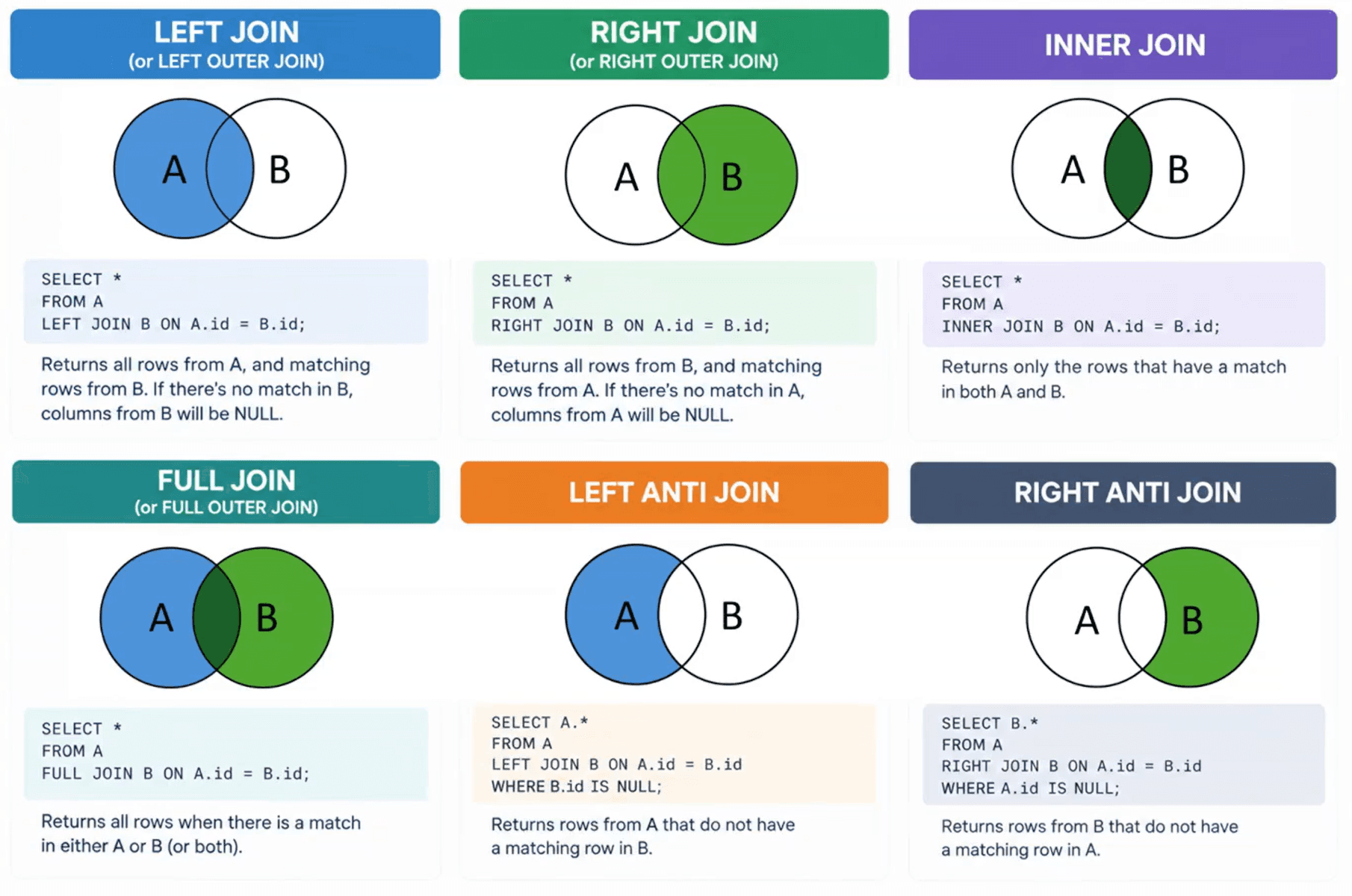
A shop keeps its data in two tables. The orders table has one row per order: an order_id, the client_id of the buyer and the amount. The clients table has one row per person: a client_id, an email and a name.
Orders Table
| order_id | client_id | amount |
|---|---|---|
| 1 | 101 | 10 |
| 2 | 102 | 23 |
| 3 | 103 | 7 |
| 4 | 104 | 11 |
| 5 | 105 | 5 |
Clients Table
| client_id | name | |
|---|---|---|
| 101 | Mary Jane | maryj@email.com |
| 102 | John Wick | johnw@email.com |
| 103 | Tony Stark | tonys@email.com |
| 104 | Sponge Bob | bobs@email.com |
| 105 | Peter Parker | peterp@email.com |
Order 1 says client 101 spent 10. The orders table can't tell you who client 101 is, because names and emails live in the clients table. The client_id column links them.
The split is deliberate. If each order row carried the client's name and email, Mary Jane's details would repeat on all of her orders. A new email address would mean editing dozens of rows, and one missed row leaves two versions of Mary in your data. With two tables, her details sit in one row and you edit them once.
You pay for the split at analysis time. To get the total spent per client name, you need the amount from one table and the name from the other. A join puts them back together: a join matches rows from two tables through a shared column, the key, and returns them side by side.
Joining orders to clients on client_id gives this:
| order_id | client_id | name | amount | |
|---|---|---|---|---|
| 1 | 101 | Mary Jane | maryj@email.com | 10 |
| 2 | 102 | John Wick | johnw@email.com | 23 |
| 3 | 103 | Tony Stark | tonys@email.com | 7 |
| 4 | 104 | Sponge Bob | bobs@email.com | 11 |
| 5 | 105 | Peter Parker | peterp@email.com | 5 |
All five orders found their client. Real data has gaps: a new client has no orders, or an order points to a client someone deleted. Your join type controls what happens to those rows. Pick the wrong one and rows vanish with no error message. An inner join where you needed a left join drops orders from your revenue total, and nothing warns you.
Both SQL and Power Query depend on joins. SQL writes them as JOIN clauses. Power Query calls them merges and puts them behind a dialog window. The operation is the same in both, so the join types you learn in one carry over to the other. Reports that combine two tables, from a monthly sales summary to a data warehouse model, rely on joins.
Merging tables in Power Query
Power Query calls a join a merge. The steps below end at the window where you choose the join type. They stay the same for all six joins in this post.
- Load both tables into the Power Query Editor. In Excel, select a cell in each table and choose Data > From Table/Range. In Power BI Desktop, load them with Get data, then choose Transform data.
- On the Home tab, in the Combine group, click Merge Queries. The dropdown offers Merge Queries as New, which puts the result in a new query and leaves both sources untouched. I use that one.
- The Merge window opens with the left table on top and the right table below. Choose each one from its dropdown. Merge Queries fills the top dropdown with the query you had selected, and Merge Queries as New leaves both empty.
- Click the key column in the top table, then the matching column in the bottom table. Both headers highlight, and a message at the bottom of the window estimates how many rows match.
- Open the Join Kind dropdown at the bottom of the window and choose the join type. Left Outer is the default.
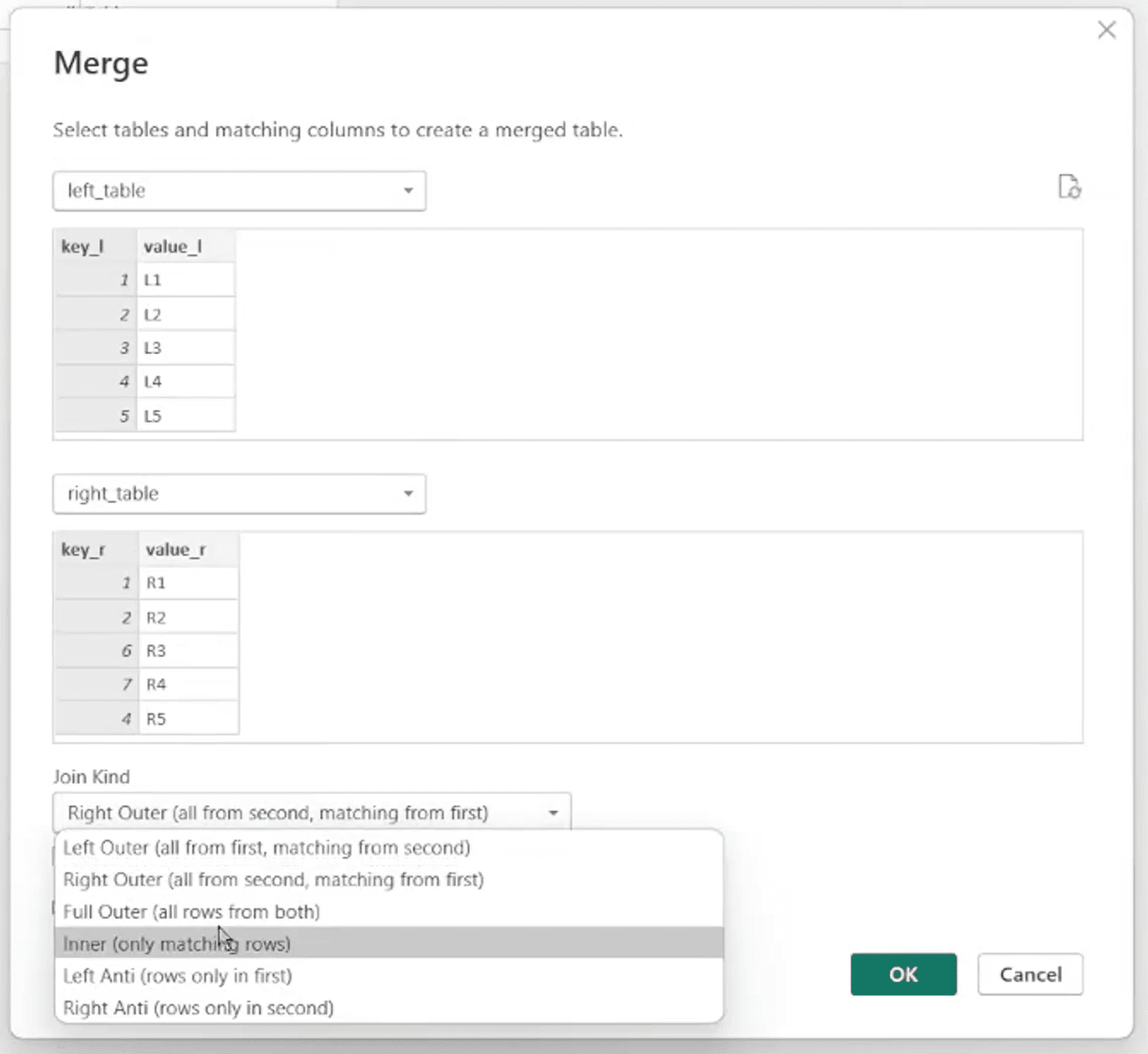
The six joins below differ in one setting: the Join Kind dropdown. Everything before it stays the same, so each section names the option to select.
The example tables
The examples use two tables named left_table and right_table. In Power Query they're two queries with those names. In SQL they're two tables with the same names.
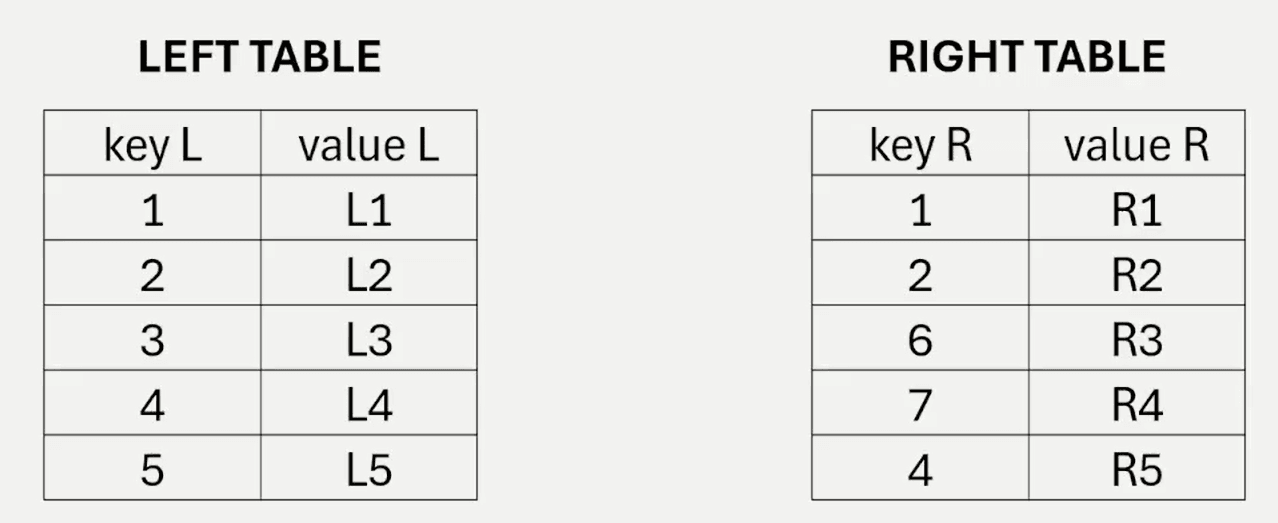
Keys 1, 2 and 4 exist in both tables. Keys 3 and 5 belong to left_table. Keys 6 and 7 belong to right_table. Row order plays no role: key 4 sits in the fourth row on the left and the last row on the right, and the join pairs L4 with R5.
SQL column names can't contain spaces without quoting, so the code uses key_l, value_l, key_r and value_r. This script builds both tables:
CREATE TABLE left_table (
    key_l   INT,
    value_l VARCHAR(10)
);

CREATE TABLE right_table (
    key_r   INT,
    value_r VARCHAR(10)
);

INSERT INTO left_table (key_l, value_l)
VALUES (1, 'L1'), (2, 'L2'), (3, 'L3'), (4, 'L4'), (5, 'L5');

INSERT INTO right_table (key_r, value_r)
VALUES (1, 'R1'), (2, 'R2'), (6, 'R3'), (7, 'R4'), (4, 'R5');The result tables below sort rows by key for readability. SQL promises no row order unless you add ORDER BY.
1. Left join
A left join keeps all rows from the left table and attaches the matching rows from the right table. The right-side columns hold null when no match exists.
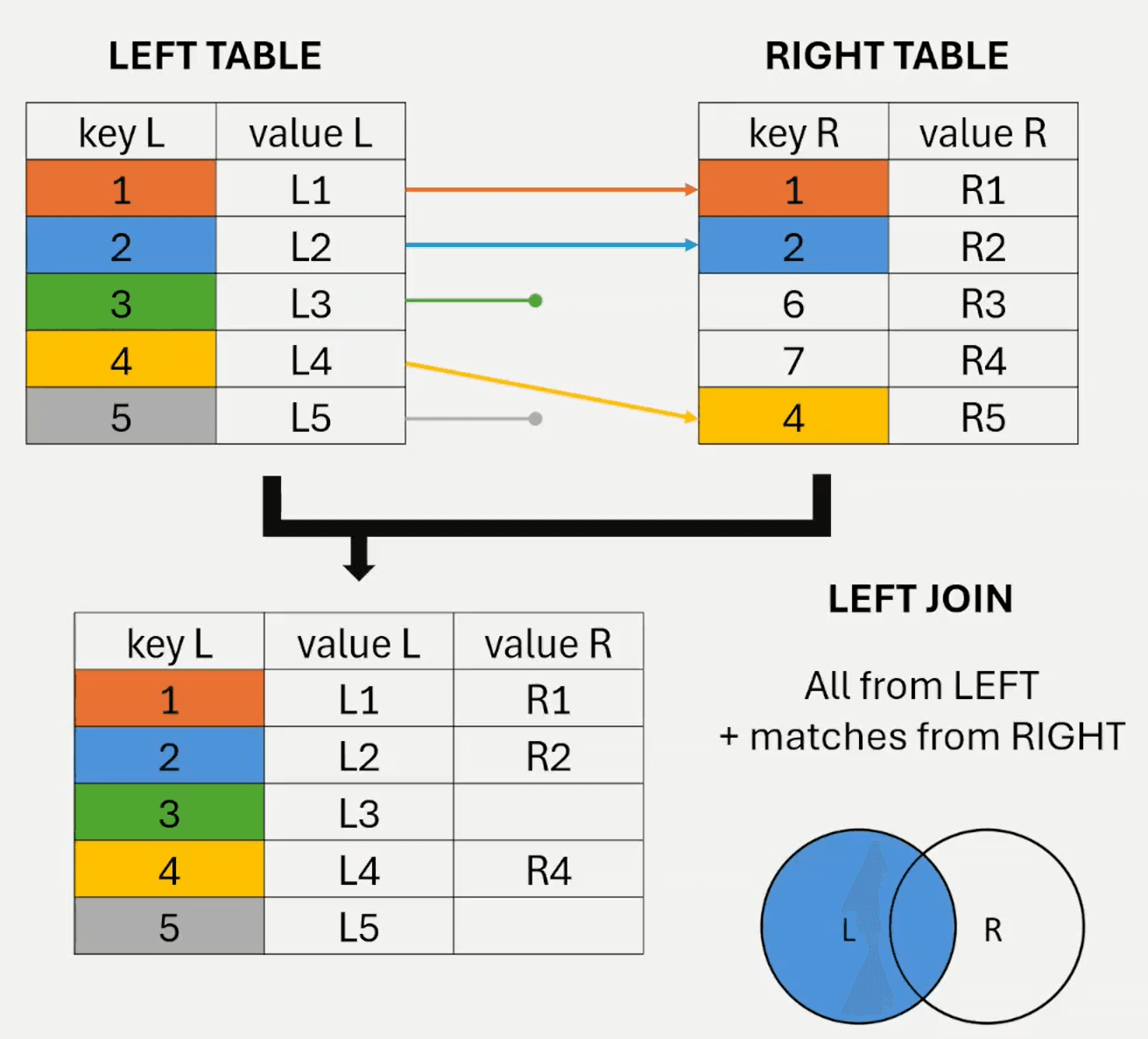
Join Kind in Power Query: Left Outer (all from first, matching from second)
SELECT l.key_l, l.value_l, r.key_r, r.value_r
FROM left_table AS l
LEFT JOIN right_table AS r
ON l.key_l = r.key_r;LEFT JOIN is short for LEFT OUTER JOIN, and both run the same.
| key_l | value_l | key_r | value_r |
|---|---|---|---|
| 1 | L1 | 1 | R1 |
| 2 | L2 | 2 | R2 |
| 3 | L3 | null | null |
| 4 | L4 | 4 | R5 |
| 5 | L5 | null | null |
All five rows of left_table survive, matched or not. Keys 6 and 7 disappear because they have no home on the left.
Use a left join when one table is your main subject and the other adds detail. Orders and clients fit: you keep all orders, including one whose client is missing from the clients table.
2. Right join
A right join mirrors the left join. It keeps all rows from the right table and attaches the matching rows from the left table.
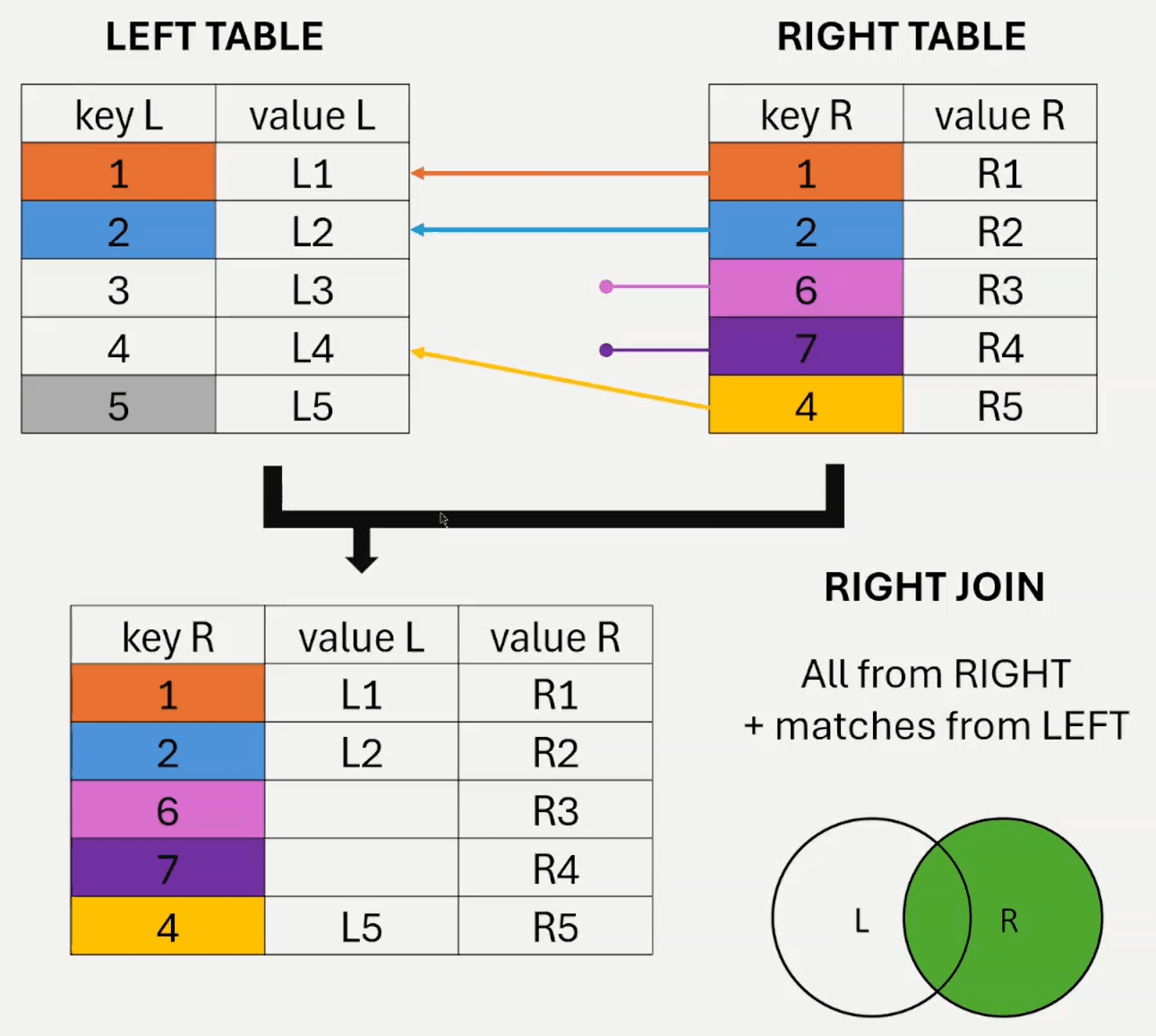
Join Kind in Power Query: Right Outer (all from second, matching from first)
SELECT l.key_l, l.value_l, r.key_r, r.value_r
FROM left_table AS l
RIGHT JOIN right_table AS r
ON l.key_l = r.key_r;| key_l | value_l | key_r | value_r |
|---|---|---|---|
| 1 | L1 | 1 | R1 |
| 2 | L2 | 2 | R2 |
| 4 | L4 | 4 | R5 |
| null | null | 6 | R3 |
| null | null | 7 | R4 |
Keys 6 and 7 come through with null in the left columns, and keys 3 and 5 vanish. A right join returns the same rows as a left join with the two tables swapped. I default to left joins and reorder the tables, so the main table comes first when I read the query.
3. Inner join
An inner join keeps the rows whose key exists in both tables and drops the rest.
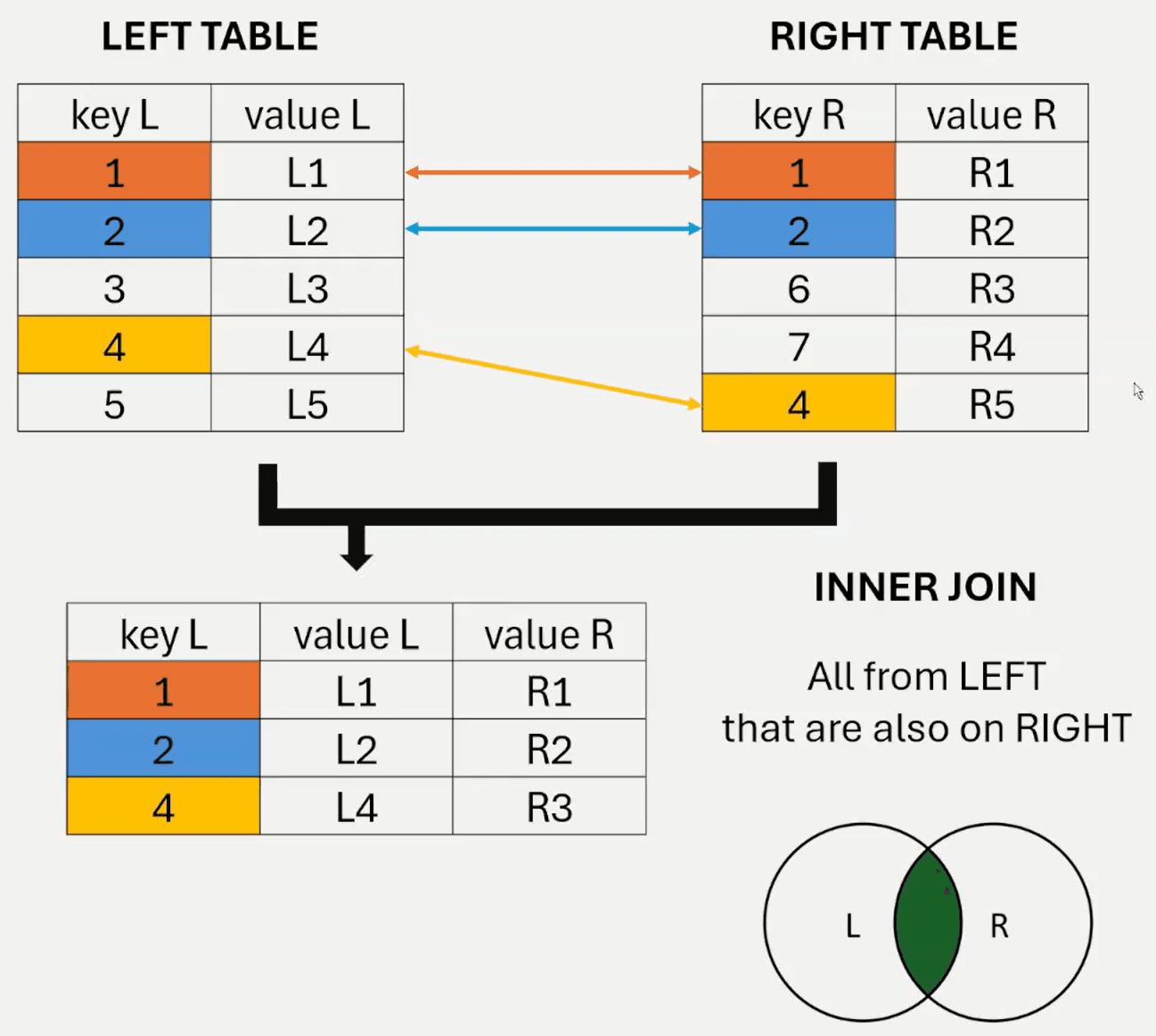
Join Kind in Power Query: Inner (only matching rows)
SELECT l.key_l, l.value_l, r.key_r, r.value_r
FROM left_table AS l
INNER JOIN right_table AS r
ON l.key_l = r.key_r;JOIN on its own means INNER JOIN in SQL.
| key_l | value_l | key_r | value_r |
|---|---|---|---|
| 1 | L1 | 1 | R1 |
| 2 | L2 | 2 | R2 |
| 4 | L4 | 4 | R5 |
Three rows survive. L3, L5, R3 and R4 disappear, and no error message tells you. An inner join deletes the unmatched rows from both sides.
Use it when you need complete pairs, such as orders that have a known client. In Power Query, read the message at the bottom of the Merge window before you click OK. It shows how many rows from the first table match, so you can spot losses before they happen.
4. Full join
A full join keeps all rows from both tables. Matched rows line up side by side, and rows without a partner appear with null on the missing side.
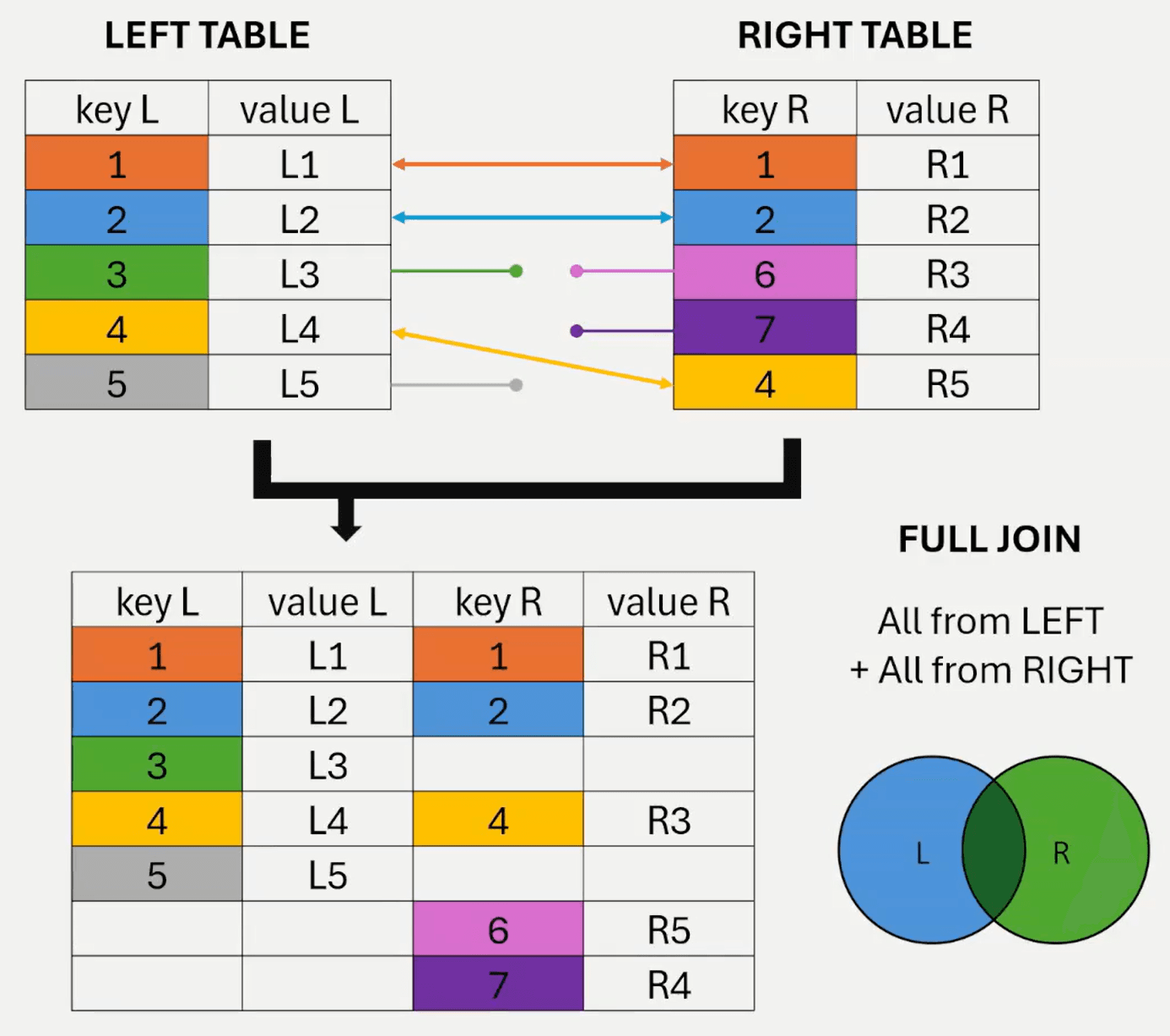
Join Kind in Power Query: Full Outer (all from both)
SELECT l.key_l, l.value_l, r.key_r, r.value_r
FROM left_table AS l
FULL OUTER JOIN right_table AS r
ON l.key_l = r.key_r;| key_l | value_l | key_r | value_r |
|---|---|---|---|
| 1 | L1 | 1 | R1 |
| 2 | L2 | 2 | R2 |
| 3 | L3 | null | null |
| 4 | L4 | 4 | R5 |
| 5 | L5 | null | null |
| null | null | 6 | R3 |
| null | null | 7 | R4 |
Seven rows come back: three matches, two rows from the left table and two from the right table. A null on either side marks a row that exists in one table.
Use a full join to reconcile two lists, such as an ERP export against a CRM export. The result shows what each system has, what the other lacks, and what they share.
5. Left anti join
A left anti join returns the rows from the left table that have no partner in the right table.
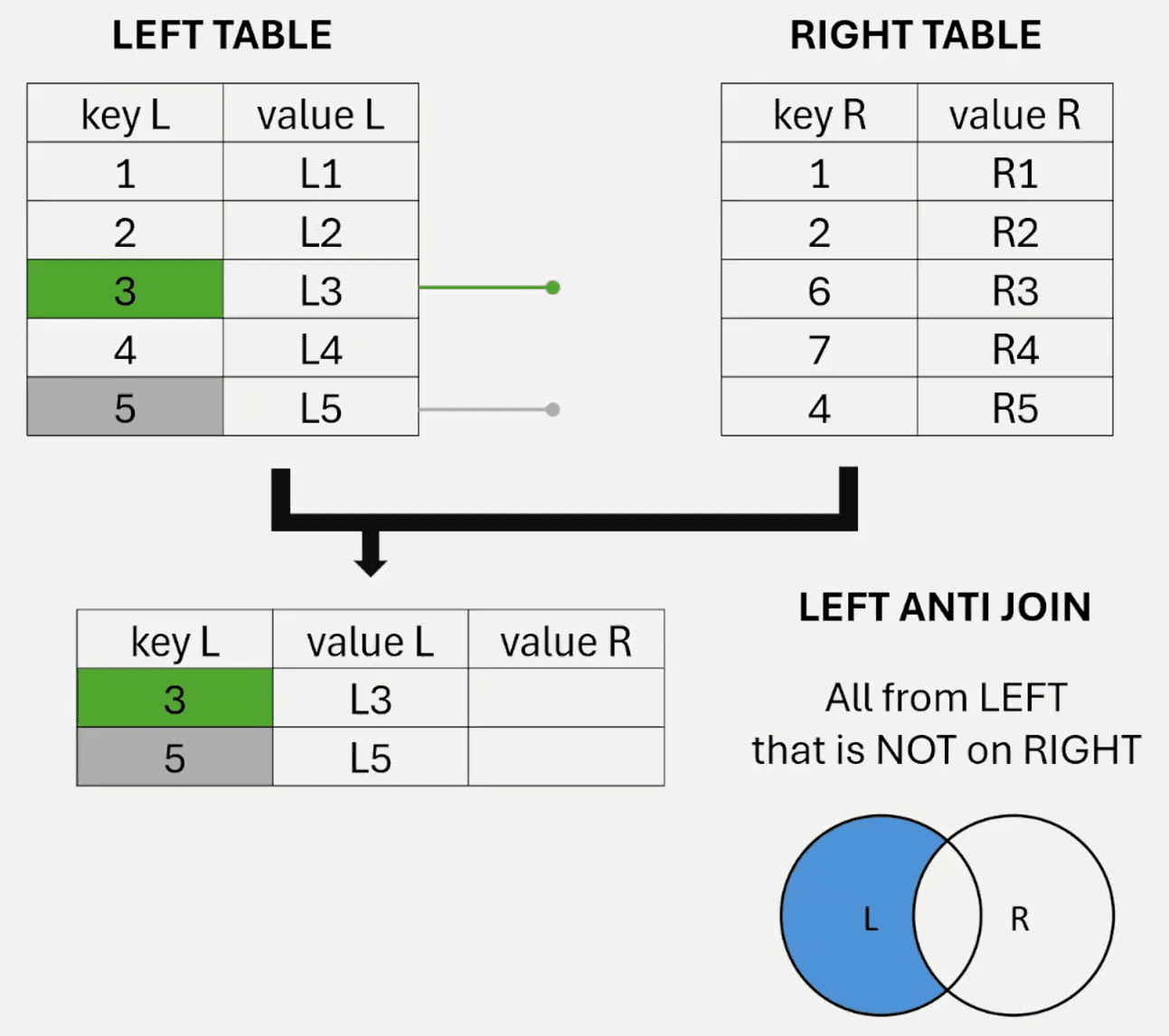
Join Kind in Power Query: Left Anti (rows only in first)
Power Query returns the right table's columns filled with null, because a left anti join brings no values from the right table.
SELECT l.key_l, l.value_l
FROM left_table AS l
LEFT JOIN right_table AS r
    ON l.key_l = r.key_r
WHERE r.key_r IS NULL;PostgreSQL and SQL Server have no anti join keyword, so you write a left join and filter on the right key being null. The join attaches null to left rows without a partner, and the WHERE clause keeps those rows. Spark SQL and Databricks do offer LEFT ANTI JOIN.
| key_l | value_l |
|---|---|
| 3 | L3 |
| 5 | L5 |
A left anti join gives you the rows with no match on the right. Put clients on the left and orders on the right to list clients with no orders. Reverse them to find orders that point to a missing client, a common data quality check.
6. Right anti join
A right anti join returns the rows from the right table that have no partner in the left table.
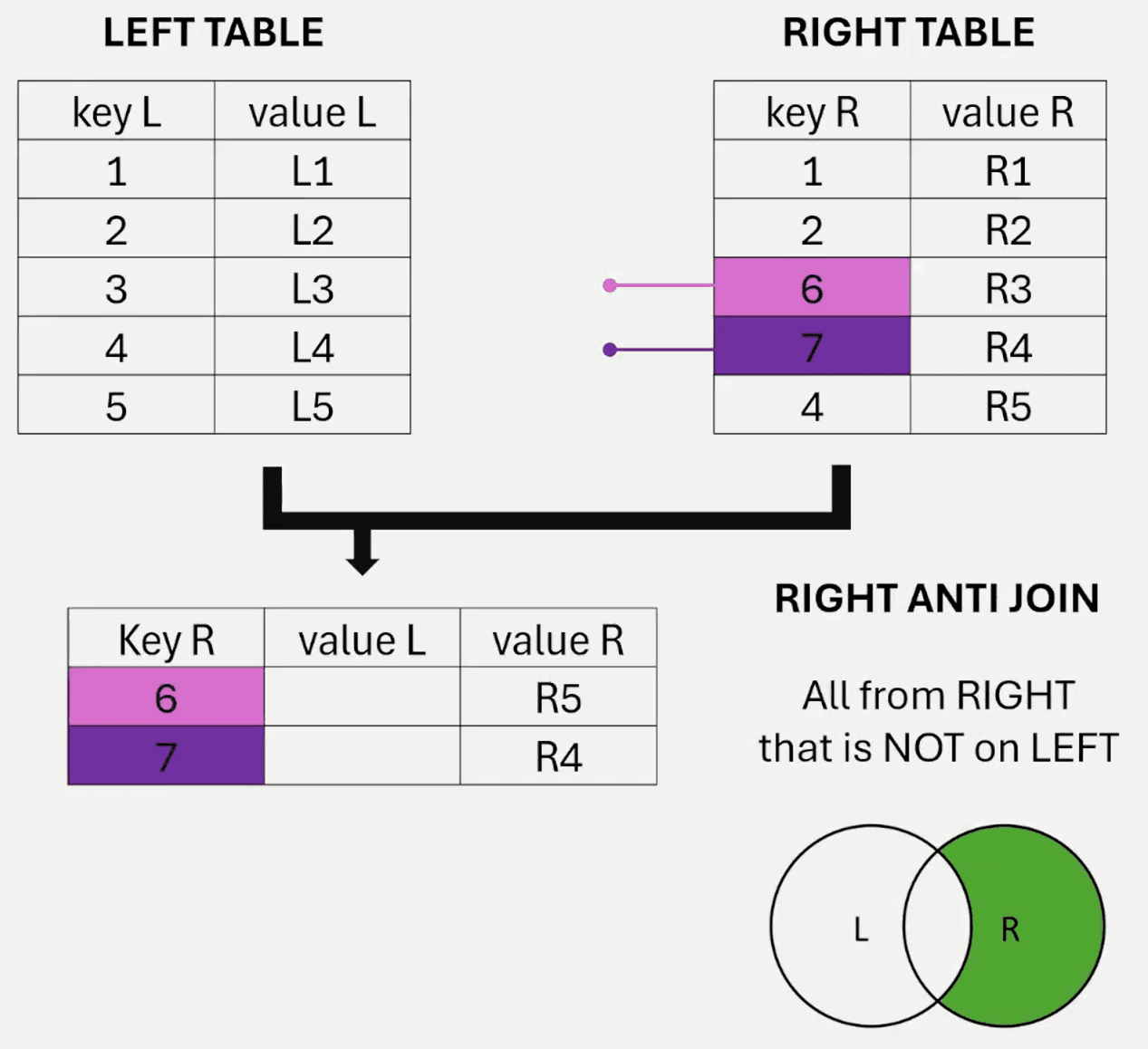
Join Kind in Power Query: Right Anti (rows only in second)
Power Query returns the left table's columns filled with null, because a right anti join brings no values from the left table.
SELECT r.key_r, r.value_r
FROM left_table AS l
RIGHT JOIN right_table AS r
    ON l.key_l = r.key_r
WHERE l.key_l IS NULL;| key_r | value_r |
|---|---|
| 6 | R3 |
| 7 | R4 |
Swap the two tables and a right anti join becomes a left anti join. Both return the same rows, so choose whichever order reads better in your query.
Choosing the right join
| Join | Keeps | Power Query Join Kind | Keys in the example |
|---|---|---|---|
| Left | All left rows, matches from right | Left Outer | 1, 2, 3, 4, 5 |
| Right | All right rows, matches from left | Right Outer | 1, 2, 4, 6, 7 |
| Inner | Rows present in both tables | Inner | 1, 2, 4 |
| Full | All rows from both tables | Full Outer | 1, 2, 3, 4, 5, 6, 7 |
| Left anti | Left rows with no match | Left Anti | 3, 5 |
| Right anti | Right rows with no match | Right Anti | 6, 7 |
Decide what should happen to rows without a partner, then pick the join that does it. Keep them from one side for a left or right join, or from both sides for a full join. Drop them for an inner join, or return them as the whole result for an anti join. A right join and a right anti join match their left versions once you swap the tables.